SuaMEI: financial management platform for MEIs
Information architecture, modules and visual system of a financial management platform for Brazilian micro-entrepreneurs.

Erick Nobre 2020–2022 case study · 6 min read
UX/UI- Role
- Junior UX/UI Designer
- Contract
- Contractor (PJ), 2020–2022
- Model
- Fintech for MEIs
- Scope
- 6+ modules, desktop and mobile
- Deliverables
- Prototypes, design system and HTML and CSS handoff
- Impact
- 2,500+ MEIs and 250+ companies
Context and challenge#
SuaMEI was founded in 2020 to serve MEIs (Microempreendedor Individual, Brazil’s simplified legal status for self-employed micro-entrepreneurs), an audience in which 7 in 10 are irregular, according to Sebrae (Brazil’s small business support agency), often without knowing it. I worked as a Junior UX/UI Designer, on a contractor basis (PJ), from 2020 to 2022 and took part in the whole product cycle: research, conception, ideation, prototyping and usability testing. The challenge was to reconcile the complexity of MEI legislation with an interface that someone unfamiliar with financial software could understand at once, on a phone and in the middle of the workday. The platform brings together a digital account, taxes, invoices, contracts and benefits, which entrepreneurs used to find scattered across government portals and banks. The screens in this case study were generated in Google Stitch from the product brief and use fictional data. The interface is in Portuguese, as in the original product.
Information architecture#
The audience is MEIs who organize their own income, expenses and tax obligations, so the structure prioritizes frequent tasks, with direct language and few steps. Navigation has six areas, listed below, and the sidebar makes it clear where the user is and lets them switch modules easily. In the top bar, Pagar DAS (pay the monthly MEI tax slip) and Novo Pix (new instant payment) stay visible in every module. Read-only information is kept apart from actions that move money, and fees, deadlines and consequences appear before confirmation.
- OverviewFinancial summary, indicators, charts and shortcuts
- Finance and Digital AccountIncome, expenses, statement, transfers, payments, billing and card
- My CompanyRegistration data, taxes, invoices and contracts
- BenefitsService catalog, enrollment and management
- My Account and My ProfilePersonal data, photo, address, bank accounts and settings
- PreferencesCategories, tags, personalization and financial preferences
Platform modules#
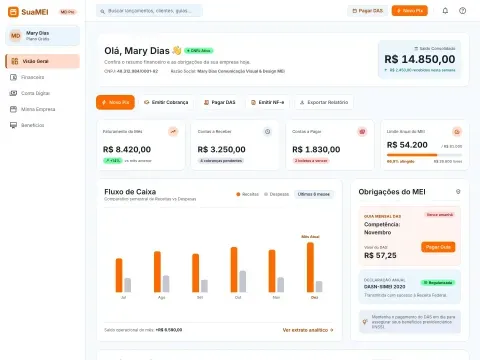
I designed six modules: Overview, Finance, Digital Account, My Company, Benefits and onboarding, all with empty, error and success states. The Overview, which opens this case study, brings together the consolidated balance, the month’s revenue, accounts receivable and payable, the MEI annual limit and the DAS slip with its due date highlighted, so pending items show up without opening another screen. The other modules follow, each with its screen and the interface decision it shows.
Finance module#
Digital Account module#
My Company module#
Benefits module#
Visual system#
The visual system uses a white background, legible typography and the brand’s orange only for occasional highlights, such as the main button and the active menu item, so data and statements stay in the foreground. On the screens, green and red appear only as status. The component library in Figma, with documented tokens, served desktop and mobile, with the responsive adaptations documented by breakpoint, and the handoff included detailed specs and hands-on support during the HTML and CSS implementation.
Mobile version#
Access happens almost always on a phone, in the middle of the workday and often on an unstable connection, so every screen has to be clear at once. The mobile version keeps the five main modules in a bottom bar, with the current destination in orange, and turns the desktop’s cards and tables into full-width blocks: the balance, the action shortcuts and the DAS slip come first, and the frequent actions (new Pix, pay DAS and issue invoice) become buttons above the fold.
OverviewBalance and shortcuts first FinanceStatement as a list Digital AccountActions in blocks My CompanyDAS at hand
Results and takeaways#
The platform launched in 2020 on mobile and desktop and has served more than 250 companies and 2,500 MEIs, with R$ 8.1M+ in invoices issued. The payment, invoice issuing, account opening and company tax ID regularization flows were prototyped and validated before development, and the documentation in Figma, with hands-on HTML and CSS support, reduced friction between design and front-end. What I take from the project is to test every flow that moves money with real users: payment, which got special attention in testing, ends with a review of the details and a password confirmation.