


EZ Topology: interface design for complex network systems
I structured the EZ Topology experience and turned technical network settings into logical operational flows for infrastructure professionals.
- 100%
- Flows mapped. The complete experience, from login to the network map delivered by email.
- DS
- Design system. A component library with tokens, variants and states, ready for the front-end.
- 4
- Critical journeys: authentication, setup, node mapping and results, with explicit visual feedback.
- ☾
- Native dark mode, to reduce eye strain in IT professionals’ work environment.
About the product
A technical tool designed to be used right away
The EZ Topology context called for a design focused on positioning the tool clearly and on the efficiency of the people who use it.
Harpia Networks created EZ Topology to automate the discovery of computer networks by mapping their physical topology. Manual work gave way to a process that finishes in a few minutes, with the results organized and sent straight to the customer’s email.
The business model requires an almost zero learning curve. Users buy tokens, install the collection agent and connect the system to the network. Devices are identified automatically, through the SNMP protocol.
The audience includes tier 2 support professionals, infrastructure students and network administrators. These people master complex protocols and look for interfaces that make the day easier without hours of training or reading manuals.
- Figma
- Design system
- Wireframes
- Dark mode
- Desktop and web
The challenge
Organizing dense data in a functional interface
EZ Topology deals with very specific concepts, such as SNMP protocols, IP addresses and Meraki settings. Exposed the wrong way, these terms would stall use and the efficiency of the whole system.
The main challenge was to design an outer layer that made very technical internal processes readable.
Each screen had to make clear what the user needed to do, why, and what result to expect. That level of clarity prevents configuration errors and keeps the workflow steady.
Technical settings without context
SNMP, Meraki and CDP buttons and shortcuts needed built-in visual explanations, so nobody would need external documentation.
Fragmented setup
Creating a new project had a high risk of drop-off at several steps of the funnel.
IPs in bulk
The interface had to validate dozens of addresses in real time without visual clutter or confusion.
Long loading times
Discovering an entire network takes several minutes. The interface had to show progress actively so it wouldn’t cause anxiety.
A varied audience
The design had to work for everyone from beginner IT students to senior network administrators.
Few market references
At the time, the Brazilian market had no modern, established visual standards for tools of this kind.
My role and DesignOps
Experience architecture and a design system applied to the product
I was responsible for the solution’s entire visual layer. Every component decision started from the system’s logical needs and the expectations of real customers.
I developed the wireframes, the high-fidelity interface and an initial design system in Figma. I ran the process with a craftsman’s care, prioritizing the technical precision and clarity the tool’s audience demands.
-
Wireframes and information architecture
The flows came before any visual decision. I mapped every decision point and the possible error paths, so navigation would work in a solid, predictable way.
-
High-fidelity interface
Final screens with the default, hover, focus, error, loading and empty states documented. Constant feedback prevents silent failures in critical operations.
-
Design system in Figma
A component library with color tokens for dark mode, typography and spacing. The names mirrored the structure the front-end would use at handoff.
-
Reusable templates
Recurring flows standardized as templates for configuration forms and results tables, to keep things consistent and avoid rework.
Visual solution
Dark mode as a technical usability decision
Dark mode came from the context of use. Infrastructure professionals spend the workday in dimly lit environments and needed a layout that was easier on the eyes.
The palette starts from shades of purple and deep dark blue. Mesh gradients appear only at first-contact moments (login, splash and onboarding); the inner screens use neutral surfaces to keep the focus on content.
The identity combines a technological feel with a refined finish, without losing legibility during complex operations.
Design decisions behind the experience
-
Gradients as hierarchy
Dense gradients only on login, splash and onboarding, for impact. The inner area got neutral surfaces, which read faster.
-
The sidebar as an anchor
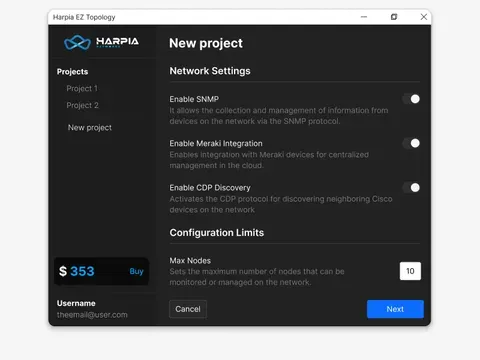
Fixed sidebar navigation with the projects, the account details and the token balance. The buy button stands out for upselling without taking over the working area.
-
Functional typography
Configuration labels, context descriptions and alerts separated by a strict hierarchy. Typographic clarity prevents serious mistakes when filling in fields.
-
Explicit states
The visual behavior of buttons and links is fully mapped. An immediate warning about an inactive component or a typo speeds up the fix.
-
Controls with context
The SNMP, Meraki and CDP controls come with a short supporting text. Customers understand the technical function at the moment they click, with no PDF guide.
-
3D illustrations in onboarding
3D illustrations that show the system’s practical benefits even before the initial setup.
Experience
The complete flow, up to the delivery of the network map
A continuous journey, designed to remove friction from every step, from authentication to the final notification.
Login and authentication
The login welcomes users with a purple and blue gradient that sets up the brand right away. Errors say exactly what was typed wrong and how to fix it. Password recovery uses illustrations to soften a tense moment.
Onboarding that gets to the point
Three short screens with 3D illustrations answer what the tool does, why use it and how to start, with no long tutorial.
New project setup
Fields appear in stages, to reduce cognitive load. Protocol selectors have supporting text, and the node limit configurator cross-checks the network size against the estimated token cost, so the cost is always clear.
Node mapping and validation
The area accepts manual input and CSV upload. Validation flags badly formatted IPs in real time and blocks data that would break or slow down the scan.
Discovery and results
The tracking screen shows that the process is running. The table lists the equipment found, with quick filters, and the full map is sent by email when processing finishes.
Gallery
The delivered screens
The approved EZ Topology flow, from login to results. Tap a screen to enlarge it.
Final thoughts
Quality design for technical tools
EZ Topology showed how much rigorous design matters in systems with dense operations.
Interfaces for infrastructure products affect data security and the speed of maintenance. Ambiguous information breaks efficiency and undermines the tech team’s trust in the platform.
I kept the focus on balancing the original technical terminology with a visually organized data architecture: a clean layout that preserves the precision of the commands and speeds up network configuration.
-
0→1
A product from scratch
Original components and flows, with no previous base, from research to the finished library.
-
4
Complete flows
Authentication, onboarding, setup and mapping, with both the success and the failure paths.
-
DS
Design system
The central library in Figma, with named tokens ready for engineering.
-
✓
Technical handoff
Templates and state logic described alongside the code patterns, to eliminate implementation noise.
Contact
Got a complex product ahead? Let’s talk.
Tell me about the project’s context and timeline. I reply within 48 hours.