


Zeev Kanban Flow: the team’s flow charts, in a tool of our own
A web tool that shows the kanban charts the Zeev team uses every day. It reproduces what we used to track in Nave (getnave.com), and the team stopped paying for the subscription.
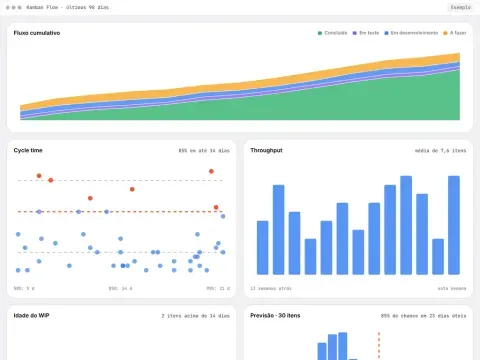
Cumulative flowDone In testing In development To do
Cycle time85% within 14 days
50%: 5 d85%: 14 d95%: 21 d
Throughputaverage of 7.6 items
13 weeks agothis week
WIP age2 items over 14 days
DevelopmentCode reviewTesting
Forecast · 30 items85% chance within 23 business days
12 days32 days
The product
Flow metrics without a subscription
The right charts show where work gets stuck before anyone has to ask.
The Zeev team works in kanban and follows the flow in its daily meetings: what is stuck, how long an item usually takes and when a batch of work will be ready. Those answers came from Nave, a kanban metrics SaaS billed by subscription.
Kanban Flow is our own version. It reads the team’s board and draws the same charts on a web page. The team kept its metrics, stopped paying for the external tool and can now adapt the charts to its own process.
Charts
Each chart answers an everyday question
-
Cumulative flow
Where is work piling up? A band that widens shows the stage where items come in faster than they leave.
-
Cycle time
How long does an item take from start to finish? Each dot is a delivered item, with lines for the 50th, 85th and 95th percentiles.
-
Throughput
How many items does the team deliver per week? The variation from week to week matters as much as the average.
-
WIP age
What has been in progress longer than usual? This is the chart that calls for action today.
-
Monte Carlo forecast
When will a batch be ready? The simulation samples real weeks of throughput thousands of times and returns a date with its probability.
-
No per-seat cost
The tool belongs to the team. Whoever joins the team gets access without adding to a bill.
How to read the dashboard
Percentiles and probabilities instead of averages
The numbers below come from the sample dashboard at the top.
“85% within 14 days”
Cycle time has a long tail: a few items take a long time and pull the average up. The 85th percentile becomes a promise that holds: 85 out of every 100 items are done within that time.
Vermilion only for what is past the limit
Dots and in-progress items above the 85th percentile turn vermilion. In the sample dashboard there are two of them, and that is where the conversation starts.
“85% chance within 23 business days”
The forecast answers with a probability. Whoever asks “when will it be ready?” gets a date with the risk attached, and picks the level of confidence they need.
Contact
Got a complex product ahead? Let’s talk.
Tell me about the project’s context and timeline. I reply within 48 hours.