
CYTEI: how I designed a solar energy SaaS for five user profiles
The process behind the screens, from the 2020 information architecture to a redesign of the platform for desktop and mobile.

Erick Nobre 2020 case study, redesigned in 2026 · 10 min read
UX/UI- Role
- Junior UX/UI Designer
- Contract
- Contractor, 3 months (2020)
- Model
- B2B and B2C SaaS
- Scope
- 5 profiles, 6+ modules
- Deliverables
- Architecture, wireframes and high fidelity in Figma
In 2020, anyone working in solar energy in Brazil handled each part of the business in a different place. Plants tracked billing in spreadsheets, investors got their numbers by email, and a consumer who wanted a lower power bill didn't know where to start.
CYTEI was created to bring those ends together on a single platform. I joined the project as UX/UI Designer on a three-month contract, to design the experience for five user profiles that share the same product and almost never want to see the same things.
This case study shows how I got to the screens: the questions I asked before opening Figma, the architecture that held everything up, the rules behind each visual decision and what happened when I came back to the project years later to redesign it.
The starting point#
The challenge pulled in two opposite directions. Plants and investors needed a lot of information on screen: billing, overdue accounts, cash flow, contracts with dozens of variables. The end consumer needed the opposite, a clean screen that answered whether joining was worth it and how much they would save.
Building two platforms was out of the question. The product needed a single structure able to change its density depending on who was logged in.
Five profiles, five questions#
Before any wireframe, I listed the profiles and the main question each one brings when opening the platform. That list became the filter for every decision that followed: if an element didn't help answer a profile's question, it left that profile's screen.
- Plants and plant owners: how much did I bill, who owes me and how much energy do I still have to sell?
- Investors: where is my money, at what rate and with what risk?
- Consumers: how much do I save and what do I need to sign?
- Specialists and EPC contractors: who needs labor and when am I available?
- Integrators: how do I prove my company is reliable and find clients?
The two audiences became clear in that list. Plants and investors form the B2B side, which reads tables and compares periods. Consumers form the B2C side, which needs few decisions, well explained.
Architecture came before screens#
With the profiles defined, I built the product map. Each module works as an independent unit, and the side menu shows only the modules that make sense for the session's profile. A consumer never sees the accounting area; an investor never runs into the plant's technical registration.
That decision solved two problems at once. Each profile sees a smaller product that is easier to understand, and the company gained room to create new modules without redesigning the navigation.
- DashboardOverview and January to December charts
- Management and financePayments, billing, revenue, expenses, invoices, accounting and IT integration
- PlantsNew plant registration and technical data (subgroup, load, output in MWp)
- DealsFind consumers and investor partners, hire specialists and EPC
- ContractsSigned contracts, financing terms and the platform's standard terms
- QualificationGeneral data, my specialties and my properties
- AccessUsers, permissions and departments
- AccountLogin, notifications integrated with WhatsApp and email, profile editing
Onboarding followed the same logic. Companies and individuals go through different qualifications, and each step asks only for what that profile needs to provide.
The interface rules#
With the structure in place, I set four visual rules to keep the screens consistent as the number of modules grew:
- Color only for status. Green for paid and regular, red for overdue and errors, yellow for what is waiting on someone. The rest of the interface stays neutral, so a late payment stands out without effort.
- Side navigation. The vertical menu frees the screen width for financial tables and charts, which are the core of running a plant.
- Actions on the data row. Sending a contract, charging a consumer or downloading a receipt happens on the table row itself. The user acts without opening another screen.
- Numbers always come with context. A value shows up next to the comparison with the previous month, the target or the average ticket, so the figure already arrives as information you can decide on.
The redesign#
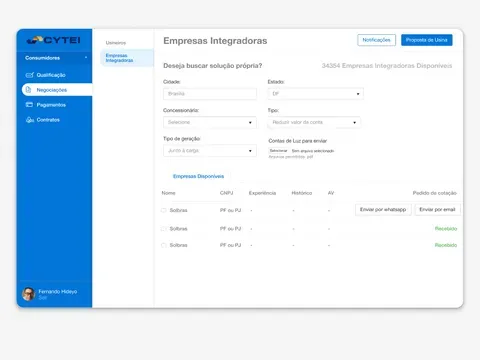
In 2020 I delivered the high-fidelity prototypes in Figma, in a light theme. In 2026 I came back to the project to test whether that architecture would hold up in today's market, which changed a lot with Brazil's legal framework for distributed generation (Law 14,300/2022).
I wrote a short art direction for the redesign: a high-contrast dark theme, violet reserved for what is clickable, green for positive status, red only for errors and thin borders instead of shadows. I used Google Stitch to generate the screens from the original architecture and worked on top of the result, keeping the four rules from 2020. The platform gained two modules that didn't exist: a shared generation consortium and automatic reading of power bills.
The comparison shows what I wanted to check: the side menu, the indicators at the top and the table with actions on each row stay in the same place. The 2020 structure took in the new modules without having to change.
Module by module#
Below are the redesigned screens and the design decisions behind each one. Tap any screen to enlarge it and browse through them.
Dashboard: the plant's health on one screen#
The manager opens the dashboard (the screen at the top of this case study) to find out whether the month is going well. That's why each of the four top indicators (generation, billing, overdue rate and active consumers) carries the comparison with the previous period and a thin bar showing the distance to the target.
Below the revenue versus expense chart sit three numbers that sum up the operation: net margin, average tariff and the split between business and individual clients. In the payments table, each row's action depends on its status. Whoever paid has the receipt; whoever is late has the charge button.
Billing: late payments come first#
The billing cycle reads from left to right in the indicators: total issued, what has come in, what is still due and what is overdue. Only the last card has a red border, because it is the only one that asks for action.
The tabs show the count for each group (all, up to date, overdue and in negotiation), so the manager knows the size of the problem before clicking. A consumer more than fifteen days late gets a reddish row and alert actions. For late payments in bulk, batch billing sits at the top as the page's main action.
Finance: what happened and what is coming#
Finance crosses revenue history with the projection for the next cycles. In the chart, actual months have solid color and projected months are muted, with an asterisk. The difference between fact and estimate is visible without an extra legend.
Next to the chart, the breakdown of operating costs appears as a single bar split by category, with the percentage and amount for each. In the list of entries, revenue comes with a green plus sign and expenses with a minus sign, and an overdue date changes color.
Consumers: the journey as a column#
The plant follows each consumer from first contact to signature. Instead of spreading that information across several screens, I created a column called journey stage, with states such as qualified lead, draft under legal review and active contract.
At the bottom, the conversion funnel sums up the same information in four numbers: contacts, qualified, in proposal and in signature. The send terms in batch button connects this screen to the contracts module.
Qualification: the power bill becomes data#
In 2020 qualification was a form: the user typed in the company data, tax ID, installed output and location. In the redesign, the starting point became the power bill itself. The plant uploads the PDF or a photo, the platform extracts the consumption history and the lead lands in the table with a credit score and a technical opinion, such as fit for consortium, fit for self-consumption or incompatible.
The eligibility criteria are explained at the bottom of the screen, and the allocation card shows how much of the plant is still free. When the lead queue exceeds the available capacity, the suggested action is to prioritize by margin.
Deals: who offers and who is looking#
This area brings together profiles with complementary interests. The investor looks for plants to finance; the plant looks for capital and labor; the specialist looks for work. Tabs separate each conversation, and the investor table keeps the variables that define risk on a single row: financing cap, rate, discount and audit status.
The specialists' schedule became a gauge: a bar split into working, available, reserved and inactive. Anyone planning a project sees in seconds how many technicians are free in the region, and each specialist comes with a star rating given by other plants.
Contracts: expiry warns you ahead#
CYTEI works with six contract types: sale, rental, loan for use, consortium, cooperative and self-consumption. The filter chips, with the count for each type, let the manager slice the portfolio in one click.
The table follows the order in which a lawyer reads a contract: subject, parties, type, term, amount, adjustment and status. At the bottom, critical clause alerts flag what is due in the cycle, such as an inflation adjustment thirty days away, and already include the button to issue the notice.
Consortium: splitting energy among members#
The consortium is one of the redesign's new modules. The plant splits the energy it generates among companies and individuals, and each member receives a slice of the output. The screen first answers whether the plant is fully committed and, right below, how the power is split among retail, services, residential and technical reserve.
The relationship with the utility got its own panel, with the current allocation list, the window for sending changes and pending items, such as a change of ownership still waiting on a filing. In the table, each member's share appears as a percentage, in kWp and as a short bar, so the portfolio can be compared at a glance.
Plant registration: progress in plain sight#
Registering a plant takes dozens of technical fields and documents from the utility. To keep the form from feeling endless, I split the content into numbered cards and put a compliance strip at the top that says how much of the registration is done and what the single pending item is.
The location, which in 2020 already had a map to validate the service area, gained the outline of the plant over the land, with latitude, longitude and leased area right below.
On mobile#
The mobile version started from a different question: what does the manager handle away from the computer? The answer defined the bottom bar, with four destinations: dashboard, billing, consortium and leads. The rest of the platform stays on desktop.
DashboardThe day's generation first BillingThe table becomes cards ConsortiumEach member in three numbers LeadsThe camera reads the power bill
The desktop tables became cards, each with a color stripe on the side that repeats the status rule. Actions also follow the status: an overdue consumer has the WhatsApp and reissue invoice buttons, one who paid has the receipt and one who is not due yet has a reminder.
Qualification was the screen that changed the most. On mobile, the PDF upload gives way to a button to photograph the power bill, and the manager qualifies a client during the visit, with the bill in hand.
What I take from this project#
The most valuable lesson from CYTEI was to start with the profiles and the architecture. In 2020, that made it possible to deliver a product with five journeys in three months without one getting in the way of another. Six years later, the same structure took in a consortium module, automatic bill reading and a mobile version without changing the navigation.
The visual rules also aged well. They worked for the light theme of 2020 as well as for the dark theme of the redesign, and adapted to the phone screen without exceptions.
If your product also needs to serve audiences with different needs on the same platform, that is the kind of problem I like to solve.